QGIS Plugin
TeamKit
In many companies, several people write their own QGIS scripts and models - but scattered, everyone on their own, with no shared place. TeamKit collects all of that in one spot and turns it into a real QGIS Processing provider: your tools show up in the Processing toolbox like built-in QGIS functions, under your company name and logo.
In plain terms
Several people at your company write QGIS scripts. TeamKit bundles them into a plugin that shows them in QGIS as your own tool collection, and the plugin automatically fetches new versions for every installation.
Languages
DE · EN
QGIS
3.x & 4.x
Qt
Qt5 & Qt6
The problem
The default QGIS scripts folder isn't enough
QGIS already has a default folder for your own scripts, so why not just drop the company scripts in there? Two reasons against it:
- Your own scripts get mixed up with the company's, and yours become hard to find.
- QGIS takes noticeably longer to start with lots of scripts in the default folder, up to 30 extra seconds, every single time.
The solution
Its own folder, its own provider
TeamKit puts the company scripts in their own Processing provider, cleanly separated from your personal scripts. Don't need the company tools right now? Just disable the plugin in the plugin manager, and QGIS starts without the delay again.
Why this plugin?
A simple foundation for teams
Your company logo, right in the toolbox
The logo you set in the settings shows up as the icon in the QGIS Processing toolbox, right next to your company name, just like any built-in QGIS provider (e.g. "GDAL" or "SAGA").
Sync on demand or automatically
One click on "Sync now" is enough. Or set an interval and syncing runs by itself in the background.
Easy to extend
Just drop new models (*.model3) or scripts (*.py) into the central source. They show up for everyone automatically at the next sync.
How to set it up
5 steps
A folder or website with the scripts
Set up a network folder or a web address (ZIP file) where everyone on the team can drop their *.py and *.model3 files.
Connect the plugin
Enter that folder or URL as the source in TeamKit's settings.
Add a logo
Pick your company logo, it then shows up as the icon in the Processing toolbox.
Set an interval
Decide how often to sync automatically (e.g. every 7 days), or just sync manually with a click.
Everything bundled
From here on, all models and scripts show up bundled in the Processing toolbox, under your company's name and logo.
Settings
Everything in one place
The settings dialog under "Plugins → TeamKit → Settings…": team/provider name, logo, source, and sync interval, no hidden options.
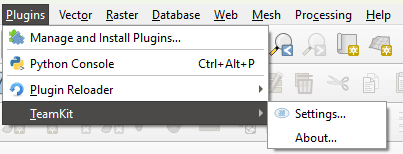
The plugin in the "Plugins → TeamKit" menu.
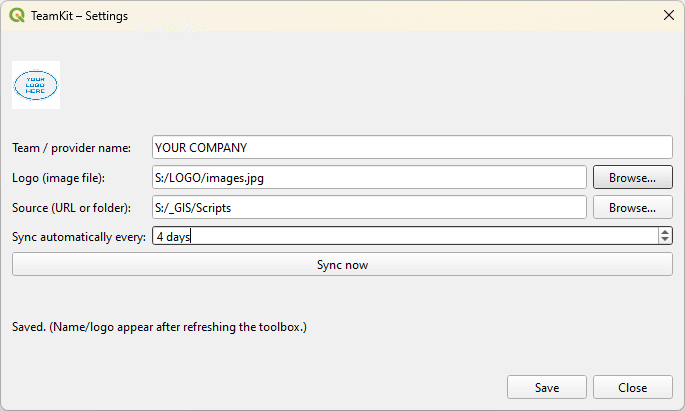
The plugin's settings dialog in QGIS.
Under the hood
Your company folder, right inside QGIS
The source stays under your control: a folder you own, for example a network drive like S:\GIS_data\models_and_scripts, where everyone on the team drops their files. TeamKit accesses it automatically from every QGIS installation and mirrors its contents into the toolbox.
Your company folder
S:\GIS_data\models_and_scripts
TeamKit plugin
syncs automatically
Processing toolbox
with your company name & logo
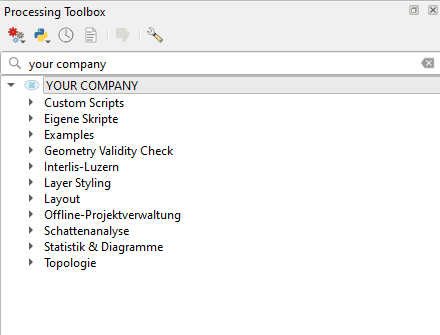
The result in the Processing toolbox: your own provider with logo, with all the categories of company scripts and models underneath.
Nothing to copy by hand: every QGIS installation on the team reads from the same company folder, so everyone stays on the same version.
Further notes
Status & compatibility
- Available in German and English (follows the QGIS language setting).
- Compatible with QGIS 3.x and QGIS 4.x (Qt5 & Qt6).
- Supports graphical models (*.model3) and class-based Python scripts (*.py).
- Models/scripts always load on startup, no separate toggle needed.
Feedback & contact
Questions or ideas?
Send me an email or open an issue on GitHub.