QGIS Plugin
Another Autosaver (and Backuper)
Automatically saves your QGIS project every X minutes - and creates a backup along with it if you want. You decide at every prompt.
Languages
DE · EN · FR
QGIS
3.x & 4.x
Qt
Qt5 & Qt6
Downloads
1'363

The problem
The crash everyone dreads
You've worked on a project for an hour, then QGIS crashes: 'QGIS ended unexpectedly'. Nothing saved, all gone.
The solution
Automatic saving, with an optional backup
Every X minutes, the plugin saves your project automatically. Want a backup too? Just pick it at the prompt.
Why this plugin?
Not just another autosave plugin
Save and backup in one step
Other plugins do either autosave or backup. Here you decide both together, with a single click.
Full control, nothing hidden
Nothing gets overwritten without asking. Every prompt shows you exactly what's about to happen.
QGIS 3.x and 4.x, actively maintained
Works with Qt5 and Qt6. Questions or requests go straight to me, by email or GitHub issue.
How it works
3 steps
Timer runs
At a configurable interval (default 10 min), the plugin checks the current project.
Change detected
If there are unsaved changes, a prompt appears automatically.
You decide
Save only, save and create a backup, or do nothing.
Live demo
Try it yourself
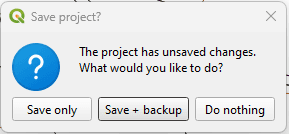
The prompt with the three options: “Save only”, “Save + backup”, “Do nothing”.
Try it: what happens when you click?
Unsaved changes - waiting for your decision.
Settings
Everything adjustable
From “Settings…” in the menu:
Interval
How often (in minutes) the plugin asks.
Backups to keep
How many old backups are kept (0 = all).
Backup folder
Where the backups are stored.
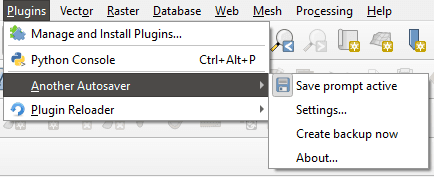
The plugin in the “Plugins → Another Autosaver” menu.
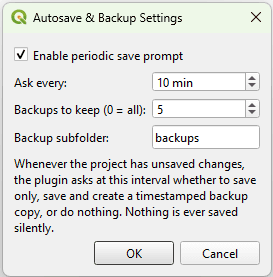
The plugin's settings dialog.
Backups
Where backups go
Every backup is timestamped and placed in a subfolder right next to the project file. Once the “backups to keep” limit is reached, the oldest one is deleted automatically.
Further notes
Status & compatibility
- Available in German, English and French (follows the QGIS language setting).
- Compatible with QGIS 3.x and QGIS 4.x (Qt5 & Qt6).
Feedback & contact
Questions or ideas?
Send me an email or open an issue on GitHub.